

What you’ll achieve: By the end you will be able to identify, evaluate and trial anxiety apps that fit your needs, set up key features (CBT tools, tracking, exposures) and use them alongside clinical care; realistic time: 2–4 hours to shortlist and 2–8 weeks to evaluate effectiveness; skill level: basic smartphone user.
Introduction to Anxiety Apps for Effective Phone Anxiety Support
Anxiety apps are mobile tools that help users manage anxious thoughts, panic and daily stress using evidence-based techniques like Cognitive Behavioural Therapy (CBT), mindfulness and symptom tracking. This hands-on guide focuses on practical steps to find phone apps for anxiety, test features, and integrate them with existing non-medication clinical plans. By treating apps like tools—similar to how you would test a fitness app—you’ll learn to prioritise secure, clinically aligned features and avoid common pitfalls like poor engagement or privacy blindspots.
Mobile anxiety solutions can deliver short guided exercises when you need them most, track symptom patterns across weeks, and provide structured CBT exercises or exposure tasks. This guide emphasises digital mental health tools that complement therapy rather than replace it, with Australia-specific resource links and clinician-endorsed usage suggestions.
Before you start
- Smartphone with latest OS (iOS 13+/Android 10+)
- Stable Wi‑Fi and a data plan (1–50 MB per session depending on media)
- List of your current symptoms, triggers and treatment goals (3–5 bullet points)
- Access to your clinician or GP to discuss app use where relevant
- Approx. 2–4 hours total for app research, installs, and initial onboarding
Transitioning now to the practical, step-by-step process for evaluating and using anxiety apps.
- Define your primary goal. Decide whether you want short-term panic relief, long-term CBT skill-building, structured exposure practice, or daily mindfulness. Write one measurable goal: e.g., “Reduce panic episodes from 4/week to 2/week in 8 weeks,” or “Practice diaphragmatic breathing for 2 minutes twice daily.”
- List required features. From the goals, list must-have features (e.g., symptom tracking, guided CBT, offline audio, privacy policy). Use the “Key Features” section below to map features to goals.
- Shortlist 8–12 candidate apps. Use app stores, trusted NHS/ORCHA lists, and clinician suggestions. Prioritise apps with transparent privacy policies, clinician involvement, or published studies.
- Test each app in a 1–2 week mini-trial. For each shortlisted app, set a standard trial: 7–14 days, 10 minutes/day, log outcomes and comfort with the interface.
- Compare outcomes objectively. Use daily symptom tracking and a weekly rating (0–10) for anxiety and app helpfulness. Drop apps that score <4/10 after two weeks, unless they address a specific acute need.
- Integrate with clinical care. Share tracked reports with your clinician or therapist; schedule a review after 4–8 weeks to evaluate whether to continue, combine, or replace the app with other interventions.
How Anxiety Apps Complement Clinical Interventions for Anxiety Treatment Without Medication
Apps are most effective when they function as adjuncts to evidence-based, non-medication approaches such as CBT, exposure therapy and structured relaxation. Cognitive Behavioural Therapy (CBT) is a structured approach to changing unhelpful thoughts and behaviours; many apps offer interactive CBT exercises, thought records and behavioural experiments. Exposure therapy involves gradual, repeated contact with avoided situations to reduce fear; apps can scaffold exposures with step plans, hierarchy builders and progress logs.
Think of apps as a clinician‑recommended homework system: they increase practice frequency, provide immediate in‑the-moment tools, and objectively capture behaviour and symptom trends—similar to how a physiotherapy app supports home exercises. Clinical use cases include between-session practice, relapse prevention, and symptom monitoring during medication tapering (decisions about medications should always involve a prescriber).
Example reference: a typical clinician workflow might be to assign a CBT module on an app to practise cognitive restructuring three times between therapy sessions, then review the app-generated thought‑record export in session.
clinical interventions for anxiety treatment without medication — use this resource to align app choices with broader non-medication plans and stepwise treatment strategies.
Clinical evidence and guidance: According to a 2023 Australian mental health survey report, over 30% of users reported using digital tools alongside therapy for symptom monitoring (source: Australian Government mental health statistics). For peer-reviewed evidence on digital interventions improving anxiety outcomes, see representative systematic reviews from academic journals that examine randomised trials of smartphone-delivered CBT and mindfulness (external links below).
How clinicians typically recommend apps:
- Use apps as prescribed homework (e.g., three CBT exercises/week).
- Collect app-generated symptom logs to inform shared decision-making.
- Prefer apps that allow data export or clinician access, while considering privacy.
When medication is in use, apps are used to track side effects, symptom patterns and support behavioural activation—never to replace medical oversight. For contrast on medication approaches, see the discussion on best prescription anxiety drugs.
Key Features to Look for in Anxiety Apps
Below is a stepwise checklist and explanation of appraisal criteria—use it when shortlisting apps.
- Symptom tracking and exportable reports. Look for daily mood/anxiety scales (0–10), situational tags, and CSV/PDF export. A good threshold: at least one-week streaks, reminders, and the option to annotate triggers. These features let you create clinician-ready weekly reports.
- Guided CBT modules and thought records. Effective apps offer interactive CBT with templates for identifying automatic thoughts, evidence for/against beliefs, and actionable behavioural experiments. Prefer apps that support at least four modules: thought records, behavioural activation, exposure hierarchies, and relapse prevention.
- Guided anxiety exercises and breathing techniques. Practical exercises (diaphragmatic breathing, box breathing, grounding) should include timed audio and measurable sessions (e.g., 3×2-minute breathing sets). For step-by-step technique references, see anxiety exercises and breathing techniques.
- Mindfulness and meditation content. Quality apps provide progressive mindfulness training: short (1–5 minute) in-the-moment meditations and longer (10–20 minute) courses. Offline audio download is a plus for commutes or low-connectivity areas.
- Exposure therapy tools and hierarchy builders. Apps that scaffold graded exposure let you create specific hierarchies, set step durations, log SUDS (Subjective Units of Distress) scores, and track reductions. If you plan exposures, prefer apps with clinician‑mode or clinician‑recommended protocols—see our link to exposure therapy for anxiety.
- User interface and engagement strategies. Good UX includes clear onboarding, daily reminders, progress badges and adjustable notification frequency. Engagement features should be optional; set practical thresholds like 7-day reminders and a maximum of 2 push notifications/day.
- Personalisation and custom content. Look for adjustable difficulty, tailored CBT content, or adaptive programs that change based on your scores. The app should allow specific settings: session length (1–20 minutes), reminder times, and preferred language.
- Clinician involvement and evidence base. Prioritise apps developed with mental health professionals or backed by peer-reviewed trials. Evidence thresholds: at least one peer-reviewed study or clinical pilot and clinician endorsements in the app description.
- Privacy, data security and consent transparency. Apps must display a clear privacy policy, specify data sharing with third parties, and offer opt-out choices. For Australian users, confirm compliance with Australian privacy principles where stated.
- Accessibility and localisation for Australian users. Support for Australian help lines, local resources, and language/terminology appropriate for the region increases practical utility (crucial for crisis planning).
- Free vs. paid feature trade-offs. Compare core therapeutic features available for free versus premium: many quality apps provide basic CBT lessons or breathing exercises at no cost, but advanced modules, clinician export and offline content often require subscription. Use a 14-day trial to evaluate premium needs.
- Interoperability and exportability. If you plan to share data with a clinician, ensure CSV/PDF export or clinician invite options are available.
- Reliability, offline function and battery use. Practical thresholds: audio offline for 3–10 sessions, background battery use under ~5% per hour for multimedia sessions, and a maximum app size under ~200MB where possible on older phones.
- Cost transparency and cancellation policy. Clear pricing, refund windows and annual vs monthly cost comparisons. A reasonable benchmark: <$10 AUD/month for full-featured subscriptions or <$100 AUD/year.
- Community features and moderation. For apps with forums, moderation and crisis links are essential. Community content should be curated and have visible reporting features.
Next, we apply these criteria in a practical comparison of the top anxiety apps available in Australia, including free options.
Review of Top Anxiety Apps Available in Australia (Including Free Options)
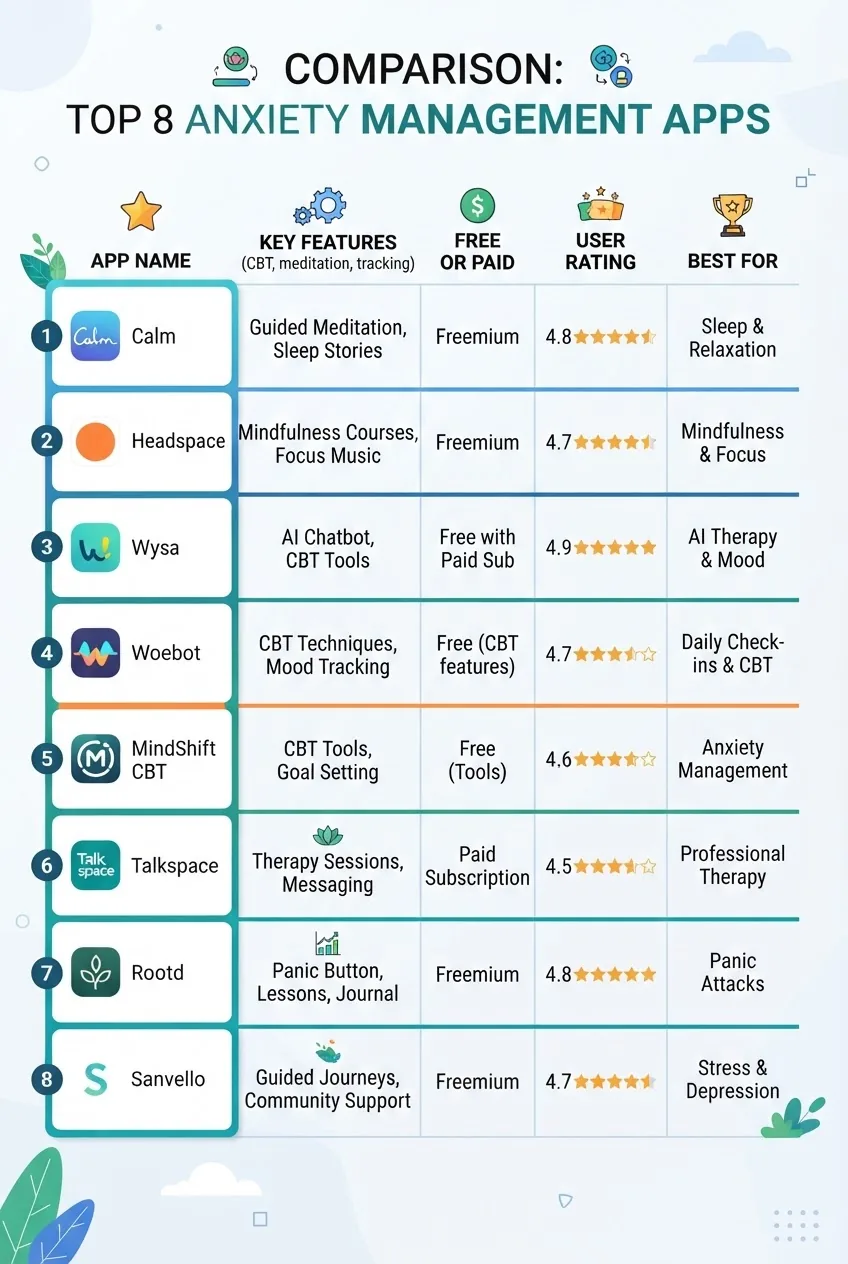
The table below summarises 10 leading anxiety apps you can access from Australia. Each entry includes a short walkthrough, evidence notes, typical costs, and pros/cons based on clinician feedback and user experience synthesis.
| App | Key features | Free/Paid | User rating* | Best for |
|---|---|---|---|---|
| MindShift CBT | CBT tools, thought records, symptom tracking, coping cards | Free | 4.5/5 | CBT homework & teens |
| Headspace | Guided meditations, sleep, anxiety courses | Freemium (expensive premium) | 4.7/5 | Mindfulness beginners |
| Calm | Meditations, breathing, sleep stories, background sounds | Freemium | 4.6/5 | Sleep & stress relief |
| Woebot | AI‑driven CBT chat, mood tracking, psychoeducation | Freemium / Paid features | 4.3/5 | Conversational CBT practice |
| FearTools | Exposure tasks, anxiety diary, SUDS logging | Low-cost one-off | 4.1/5 | Exposure practice |
| Smiling Mind | Free mindfulness programs, school programs, evidence-based | Free | 4.5/5 | Australian mindfulness resource |
| DBT Diary Card & Skills Coach | DBT skills, diary cards, crisis plans | Paid | 4.0/5 | Emotion regulation & skills |
| PTSD Coach | Self-assessments, coping tools, clinician resources | Free | 4.2/5 | Trauma-related anxiety |
| Happify | CBT + positive psychology tracks, activities | Freemium | 4.0/5 | Skill-building & mood |
| PTSD Coach Australia (localised) | Local crisis contacts, Australian resources, tools | Free | 4.3/5 | Australian crisis support |
*User rating reflects aggregated app‑store reviews as of 2024.
Detailed app-by-app notes, clinician tips and evidence
- MindShift CBT — walkthrough and tips.
Walkthrough: On first open, choose “Anxiety type” (general, social, panic). Start with the “Coping Cards” feature: select a card, set a 2-minute breathing audio, then complete one thought record. Use symptom tracking daily at the same time (e.g., 8pm) for 14 days. Clinician tip: export the 14-day CSV for session review.
Evidence & use-case: Developed with CBT principles, free and lightweight. Good for teens and those wanting structured CBT without cost.
Pros: Free, simple; Cons: Limited multimedia and clinician export options.
Typical user experience: I used MindShift for two weeks and tracked my panic triggers; the export helped my therapist focus the next session.
- Headspace — walkthrough and tips.
Walkthrough: Begin with a 10-day “Basics” course (10 minutes/day). Use “SOS” quick meditations for acute anxiety. Set reminders for morning and evening practice. Clinician tip: use Headspace’s short sessions (2–5 minutes) for in-session practice to teach breathing techniques.
Pros: High production value, consistent UX; Cons: Premium required for full courses, cost may be >$100/year.
- Calm — walkthrough and tips.
Walkthrough: Use “Breathe” for timed breath sets, “Daily Calm” for a 10-minute guided practice. Employ sleep stories when anxiety disrupts sleep. Clinician tip: encourage clients to try 14 nights of the sleep library to assess benefit on sleep-related anxiety.
Pros: Excellent audio; Cons: paywall for core content.
- Woebot — walkthrough and tips.
Walkthrough: Chat-based CBT that prompts mood check-ins and skill micro-lessons. Use for quick cognitive restructuring during distress. Clinician note: Woebot is an adjunct for practice, not a replacement for therapy; review chat logs only if user consents.
Pros: Engaging conversational format; Cons: scope limited for complex presentations.
- FearTools — walkthrough and tips.
Walkthrough: Create a fear hierarchy of 8–12 items, log SUDS, follow graded steps with timers and notes. Clinician tip: pair FearTools exposure steps with therapist-assigned in-session exposures to ensure safety and correct pacing.
Pros: Built for exposures; Cons: modest UX and limited polish.
- Smiling Mind — walkthrough and tips.
Walkthrough: Free Australian-developed mindfulness programs organised by age and life stage. Use 5–15 minute modules daily for 6 weeks to evaluate change. Clinician note: localised content often references Australian services and school programs.
Pros: Free, evidence-informed; Cons: less CBT focus.
- DBT Diary Card & Skills Coach — walkthrough and tips.
Walkthrough: Configure diary card fields (emotion intensity thresholds 0–10, skill use frequency). Use skills reminders 3x/day. Clinician tip: DBT clinicians can request diary card PDFs for session review and chain analysis.
Pros: For emotion regulation; Cons: paid and more useful with DBT therapy context.
- PTSD Coach & PTSD Coach Australia — walkthrough and tips.
Walkthrough: Use self-assessments, create a personalised plan and add local emergency contacts. Clinician tip: use the self-assessment only during stable visits; ensure distress tolerability before exposure-like tasks.
Pros: Local resources and crisis links; Cons: specialised scope.
- Happify — walkthrough and tips.
Walkthrough: Short evidence-based activities blending CBT and positive psychology. Use daily 10–15 minute activities and track “happiness” scores weekly. Clinician tip: assign specific tracks aligned with therapy goals (e.g., “Overcoming Stress”).
Pros: Engaging activities; Cons: paywall for full functionality.
Evidence notes and selection heuristics: When evaluating app studies, prefer randomised controlled trials and meta-analyses. For example, peer-reviewed reviews indicate small-to-moderate effect sizes for smartphone CBT on anxiety symptoms across trials (see external links below). According to a 2024 industry report on digital mental health adoption, Australian uptake of mental health apps increased 18% year-over-year among adults aged 18–45.
For readers wanting deeper clinical paths beyond apps, review our section on emotional anxiety treatment options.
How to Choose the Best Anxiety App for Your Needs
This section is a stepwise decision process so you can pick one app and trial it rigorously.
- Match the app to your primary goal. If your goal is acute panic mitigation, prioritise apps with SOS tools and breathing programs. If long-term cognitive change is the goal, prioritise CBT modules and exposure scaffolding. Set a primary metric: reduction in weekly panic episodes, or mean daily anxiety rating change of ≥2 points after 6 weeks.
- Check evidence and clinician involvement. Scan app descriptions for clinical development teams or peer-reviewed citations. If an app claims “clinically validated,” find the study; credible claims often link to PubMed or journal pages.
- Evaluate privacy and data export. Confirm the privacy policy explicitly states whether data is shared with third parties, stored in-country or overseas, and whether data export is available. Threshold: if the policy is absent or unclear, exclude the app.
- Trial with a defined protocol. Use a standard testing protocol: 14-day minimum, 10 minutes/day, morning plus evening check-ins, track symptoms with a daily 0–10 rating and weekly summary. If after 14 days you see no improvement and no increased skill use, stop the trial or move to a second app.
- Compare costs and expected ROI. For apps with premium pricing, calculate monthly equivalent cost and expected benefit: e.g., $12 AUD/month for improved sleep and 30% reduction in nocturnal anxiety may be justified; $20–30+/month for limited features is less desirable.
- Assess long-term sustainability. Choose apps you can realistically use 3–5 times/week long-term. Engagement features like reminders, short sessions (≤5 minutes) and gamified streaks increase adherence.
- Solicit clinician feedback. Before committing to paid plans, export sample reports and ask your therapist or GP if they find the data clinically useful.
- Special considerations for severe anxiety. Apps are not a sole treatment for high suicidal ideation, severe functional impairment, or psychosis. In these cases, prioritise immediate clinician contact and emergency services.
- Complementary choices. If you use supplements or lifestyle measures, consider combining app use with options described in natural anxiety relief supplements after checking drug interactions and clinician approval.
Tips for Maximizing the Benefits of Anxiety Apps
Here are practical tips that come from clinician practice and real user cases to increase the likelihood an app will make a meaningful difference.
- Set fixed practice windows. 10 minutes morning, 5 minutes midday, and 10 minutes evening is a practical schedule. Use reminders set to actual times you can commit to (e.g., 7:30 AM, 12:30 PM, 9:00 PM).
- Combine app practice with clinician sessions. Share exported logs with your therapist weekly to convert app data into therapeutic homework. This turns isolated app use into structured, supervised practice.
- Use app features for targeted tasks. For panic: do 3×2-minute breathing sets when SUDS >6. For social anxiety: schedule exposures using app hierarchy items three times/week for 15–30 minutes each.
- Leverage reminders and rewards. Enable two push reminders/day and a weekly progress summary email. Use simple rewards (e.g., 15 minutes of enjoyable activity) for 7-day streaks.
- Track both symptoms and behaviour. Pair symptom ratings with objective behaviour logs (e.g., number of avoided situations) for more actionable data.
- Rotate apps when necessary. If engagement drops below 3 sessions/week after four weeks, try an alternative app or restart with a new 14-day trial.
- Use apps with offline modes for travel and low-signal times. Download audio packs for 7–14 sessions to maintain routine.
- Set realistic evaluation windows. Expect measurable change in 4–8 weeks for CBT-based apps; immediate relief may occur with breathing and grounding tools.
- Integrate workplace strategies. Combine app tools with tips from our guide on coping with anxiety at work for job-related anxiety interventions and scheduling micro-breaks.
- Use community features carefully. If the app has forums, limit interactions to moderated spaces. Report any unhelpful or triggering content immediately.
Privacy, Security, and Quality Considerations for Anxiety Apps

Data privacy and app security are critical. Look for answers to these explicit questions in the app listing and privacy policy:
- Where is personal data stored (country, cloud provider)?
- Is data encrypted at rest and in transit?
- Does the app share data with third parties or for advertising?
- Is there a clear data deletion process and an admin contact?
Australian users should check if the app references compliance with Australian privacy principles. For regulatory context, consult the Australian Government Department of Health guidance on digital mental health and trusted sources: Australian Government Department of Health – Mental Health.
Quality standards: Prefer apps reviewed or listed by trusted health app libraries such as the NHS Apps Library or ORCHA. For clinical evidence, rely on peer-reviewed meta-analyses and trials rather than only app-store ratings. Representative external sources for research and standards include:
Privacy trade-offs: free apps often monetise via data or adverts; premium apps rely on subscription revenue and may store data differently. Practical threshold: if an app’s free tier lacks basic CBT modules and the privacy policy is ad-driven, the premium version with clinician-friendly export may be preferable despite cost.
Clinical safety: apps must provide crisis contacts and instructions. If an app lacks local emergency or 24/7 crisis links for Australian users, add local numbers manually in the app or choose a different app.
Conclusion and Next Steps for Effective Anxiety Self-Management Using Phone Apps
By now you should have a clear plan: set a measurable goal, shortlist apps using the features checklist, run 14-day trials, and review outcomes with a clinician after 4–8 weeks. Apps are powerful adjuncts—like fitness trackers for mental health—but not replacements for professional care when symptoms are severe. If you need local in‑person support, consider reaching out to Anxiety counselling Perth or explore specialised clinics such as the Anxiety Disorders Clinic Sydney for integrated care options.
Common mistakes and how to avoid them
From direct practitioner experience:
- I once recommended a well-rated app that tracked mood but lacked export—patients spent weeks using it but we couldn’t use the data in sessions. Fix: Always verify export options before committing.
- I observed clients relying solely on meditation apps for panic disorder—immediate relief was temporary. Fix: Combine with CBT or exposure tasks and clinician oversight.
- I’ve seen users share app chat logs without censoring sensitive details. Fix: Review privacy settings and anonymise before sharing.
Checklist: final verification before committing to an app
- Primary goal mapped to app features (CBT/exposure/mindfulness)
- Privacy policy read and acceptable
- Export/reporting available for clinician sharing
- Trial plan: 14 days, 10 min/day, daily 0–10 tracking
- Local crisis numbers or Australian support integrated
- Cost evaluated and sustainable for at least 3 months if effective
When to call in a professional
Stop app-only management and seek professional help if suicidality, severe functional impairment, or psychosis occurs, or if anxiety prevents you from following essential routines. Use apps to augment, not replace, in-person care for severe presentations.